On this page
Key takeaways
- No single tool tracks AI search visibility. GA4 shows visits from AI assistants, Search Console shows impressions in Google’s AI features, and Bing Webmaster Tools shows citations in Copilot.
- GA4 now has an AI Assistant channel, but it excludes Google’s AI Overviews and AI Mode, which still count as Organic Search.
- Search Console’s Generative AI report shows impressions only: no clicks and no queries.
- Bing’s AI Performance report is the only free report that counts citations and shows the queries behind them, but only for Microsoft’s AI surfaces.
- None of the free tools show the answers where competitors are named instead of you. For that, use a paid tracker, check by hand, or run a scan that compares you with competitors.
How do you track AI search visibility? Use three free tools together, then fill the gap they leave. Google Analytics 4 shows visits that come from AI assistants such as ChatGPT and Gemini. Google Search Console shows how often your pages appear in AI Overviews and AI Mode. Bing Webmaster Tools shows how often Microsoft Copilot cites your pages, and for which queries. None of them show the AI answers that name your competitors instead of you; for that you need a paid tracking tool, a manual check, or a scan that compares you with competitors.
AI search visibility is how often AI assistants name or cite your business when buyers ask questions in your area. It’s a results measure, separate from rankings and from readiness (see AEO vs SEO for how the two differ).
Below: what each tool shows and how to set it up, what none of them show, and a monthly routine that uses all of them.
Why there isn’t one AI visibility report
AI search happens across several platforms, and each one only reports on its own. Google knows when your pages appear in AI Overviews but not when ChatGPT cites you. Bing knows when Copilot cites your pages but not when Gemini does. Analytics sees visitors who click through, but not the recommendations that never lead to a click. That’s why tracking AI visibility takes several tools rather than one report.
The tools also count different things, and the terms are easy to mix up:
- Impression: a link to your page was shown in an AI answer.
- Citation: your page was used and linked as a source for an answer.
- Mention: your company’s name appeared in the answer text, with or without a link.
- Visit: someone clicked through to your website.
These measure different things, so the numbers will never match exactly.
What each tool shows at a glance
| Tool | What it measures | AI surfaces | What it doesn’t show |
|---|---|---|---|
| Google Analytics 4 | Visits from AI assistants, and what those visitors do | ChatGPT, Gemini, Copilot, Perplexity and others that pass a referrer | Answers that mention you without a click; AI Overviews and AI Mode (counted as Organic Search) |
| Google Search Console | Impressions in Google’s generative AI features, by page | AI Overviews, AI Mode | Clicks, queries, competitors |
| Bing Webmaster Tools | Citations of your pages, and sample queries behind them | Microsoft Copilot, AI summaries in Bing, some partner sites | Clicks; ChatGPT, Gemini and Perplexity |
| Paid SEO tools (Semrush, Ahrefs, Moz) | Mentions, citations and share of voice vs competitors, for a set of prompts | Varies by tool (ChatGPT, Gemini, AI Overviews, AI Mode, Perplexity, Copilot) | Your actual buyers’ questions, unless you add them; usually site-level, not page fixes |
| Manual checks or a checker | Who gets cited for your buyer questions, and why | Whichever assistants you ask | Trends over time, unless you repeat them |
1. Google Analytics 4: traffic from AI assistants
GA4 tells you how many people click through from an AI answer, which pages they land on and whether they become leads. It can’t tell you how often you were mentioned without a click, and for many B2B questions, that’s most of the time.
Check the AI Assistant channel first. GA4’s default channel group now includes an AI Assistant channel for visits from "sources like ChatGPT, Gemini, Deepseek, Copilot, or Grok". Open Reports → Acquisition → Traffic acquisition, keep the primary dimension as Session primary channel group (the default channel group), and look for the AI Assistant row. Add Session source as a secondary dimension to see which assistants send visits.
Two things to know:
- AI Overviews and AI Mode aren’t in it. Google counts clicks from its own AI features as Organic Search, so they’re mixed in with ordinary search clicks in GA4. Search Console (below) is where Google’s AI features show up.
- Older sessions may still sit under Referral. Visits from AI assistants before the channel was added, and from assistants not on Google’s list, can still show as Referral. Filter the Referral row by source to find them.
Build your own channel if you need more. If you want older data grouped too, or assistants Google doesn’t list, create a custom channel group: Admin → Data display → Channel groups → Create new channel group. Add a channel called "AI assistants" with the condition Source matches regex:
.*(chatgpt\.com|openai\.com|perplexity\.ai|gemini\.google\.com|copilot\.microsoft\.com|claude\.ai|deepseek\.com|grok\.com).*Then drag it above Referral. GA4 checks channels from top to bottom and stops at the first match, so a rule below Referral never catches anything. ChatGPT adds utm_source=chatgpt.com to the links it shows, so those visits match on source even when the browser doesn’t pass a referrer.
What to report each month: sessions from AI assistants, the landing pages they arrive on, and key events (form submissions, calls booked). A buyer who arrives from an AI answer has often already seen information about your company, so AI traffic may behave differently from other traffic sources; track it separately rather than judging it against the site average.
Limits: visits from AI apps on phones and desktops often arrive without a referrer and land in Direct. Treat the GA4 number as a floor, not a total.
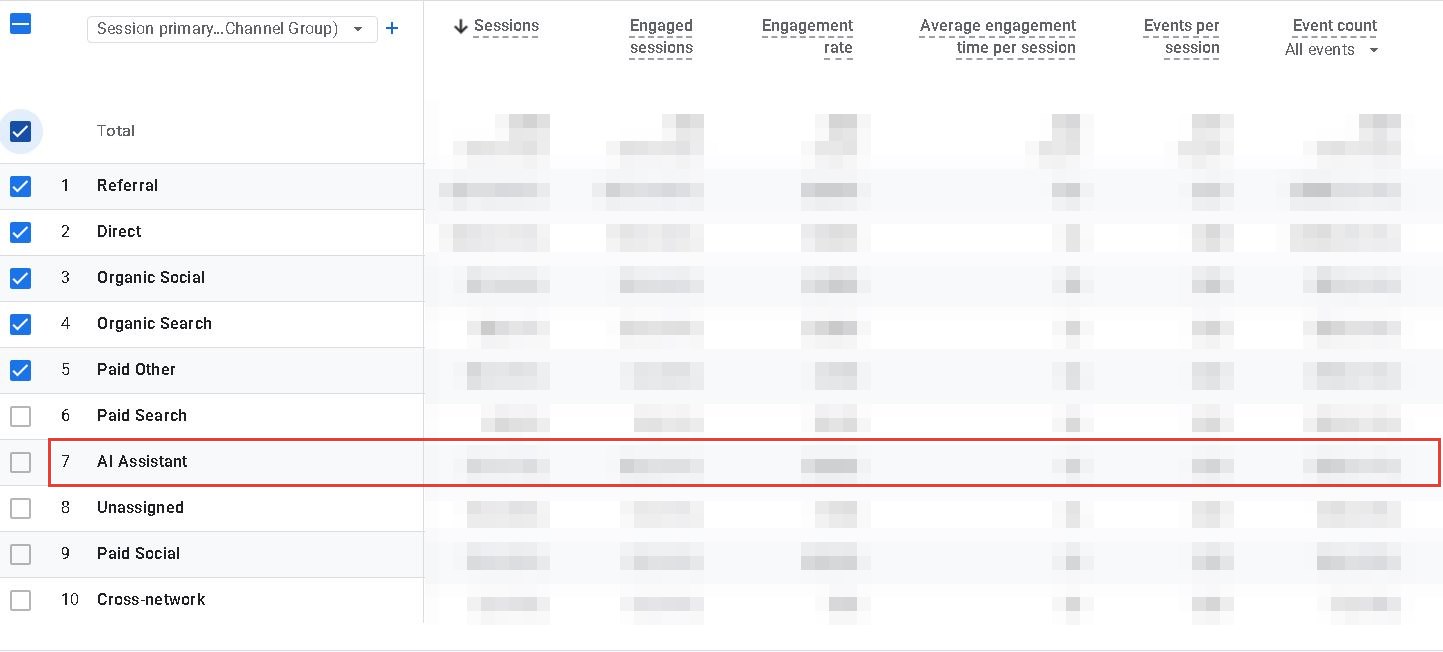
The AI Assistant channel in GA4 Traffic acquisition (sharpquest.com, numbers hidden).
2. Google Search Console: impressions in AI Overviews and AI Mode
Search Console has a Generative AI performance report (Search), available to all sites since August 2026, under Performance. It counts "how many times links to your site were shown to a user in a generative AI feature on Google Search", which covers AI Overviews and AI Mode.
What it shows:
- Impressions only, by page, country, device and date. You can switch between text searches and multimodal ones (Google Lens, Circle to Search).
- Which pages Google uses in AI answers. Sort the Pages tab by impressions; these are the pages worth keeping accurate and up to date.
What it doesn’t show:
- Clicks. Clicks from AI Overviews and AI Mode are counted in the normal Performance report, under the Web search type, but not separated from other search clicks.
- Queries. You can see which pages appeared, not which questions triggered them.
- Competitors, or how your business was described.
The chart counts by site, so two of your links in the same AI answer count as one impression in the total; the Pages table counts by page. That’s why the chart and table totals can differ. Sites with too few AI impressions don’t see the report yet.
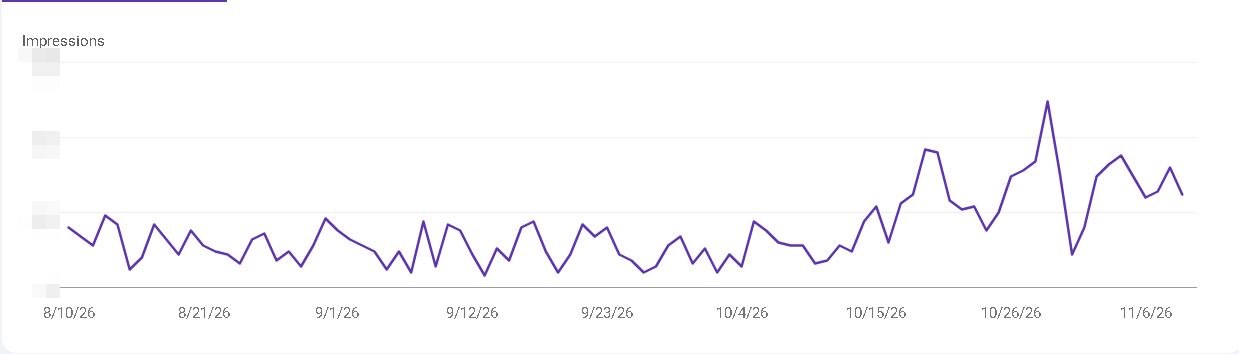
Daily impressions in Google’s AI features on sharpquest.com. They roughly doubled in the weeks after a round of AEO and SEO changes in October (numbers hidden).
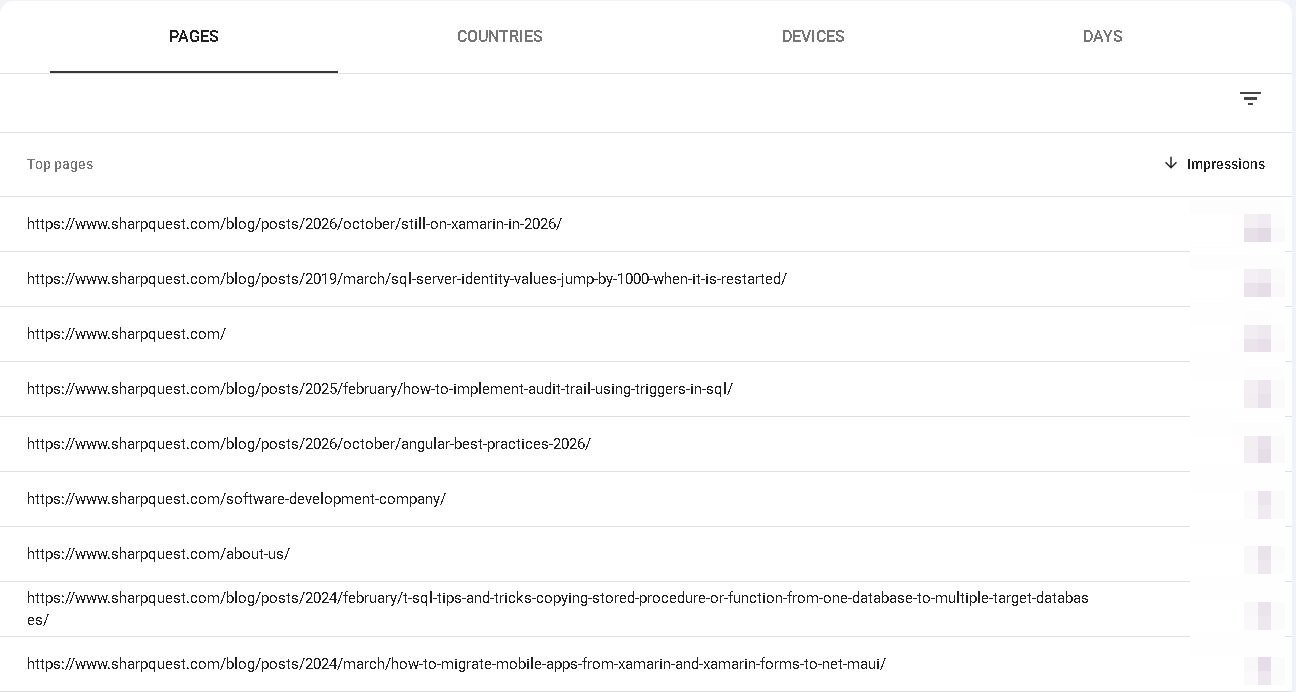
The Pages tab shows which pages Google used in AI answers. Ours are mostly older technical blog posts, not service pages (numbers hidden).
What to report each month: total AI impressions and the top 10 pages. Compare the list with the pages you’d want cited for your buyer questions. If your service pages never appear and an old blog post does, that tells you which pages need work.
3. Bing Webmaster Tools: citations in Copilot
Bing’s AI Performance report (public preview since February 2026) is the only free report that counts citations rather than visits or impressions. It covers Microsoft Copilot, AI-generated summaries in Bing and "select partner integrations".
What it shows:
- Total citations: how often your pages were cited as a source in AI answers.
- Average cited pages: how many of your pages are cited on average.
- Grounding queries: a sample of the queries the AI used to find your content, each tagged with an intent and a topic. This is the closest any free tool gets to showing which questions you’re cited for.
- Page-level citations and trends over time.
What it doesn’t show: clicks from those citations, where in the answer you appeared, or the competitors cited alongside you. Microsoft doesn’t say it includes ChatGPT, Gemini or Perplexity, so don’t read it as a measure of those.
If you haven’t set up Bing Webmaster Tools, you can import your site from Search Console in a few minutes. Copilot finds its sources through Bing, so this is also where you’d notice pages that Bing hasn’t indexed.
What to report each month: total citations, the top cited pages, and the grounding queries. Read the queries as a list of questions buyers are asking: any that match your services but cite only one thin page are worth a better answer.
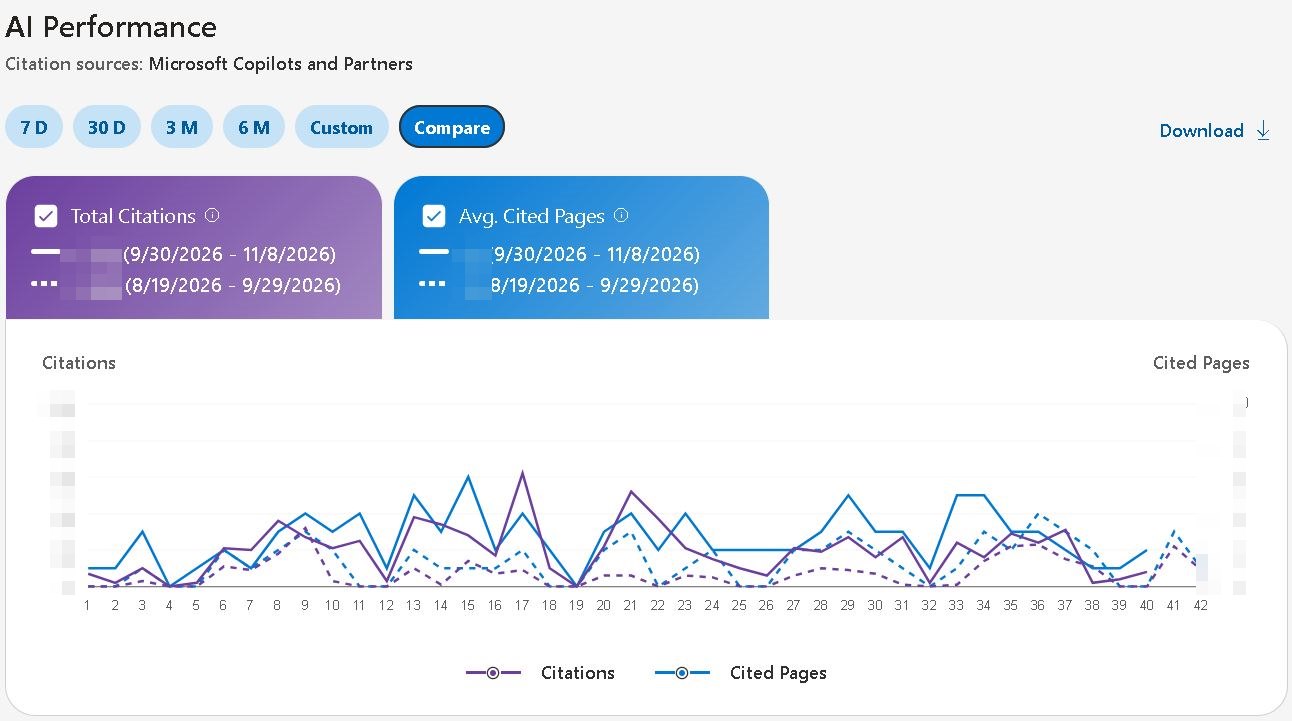
Bing AI Performance with Compare on: citations and cited pages against the previous period (sharpquest.com, numbers hidden).
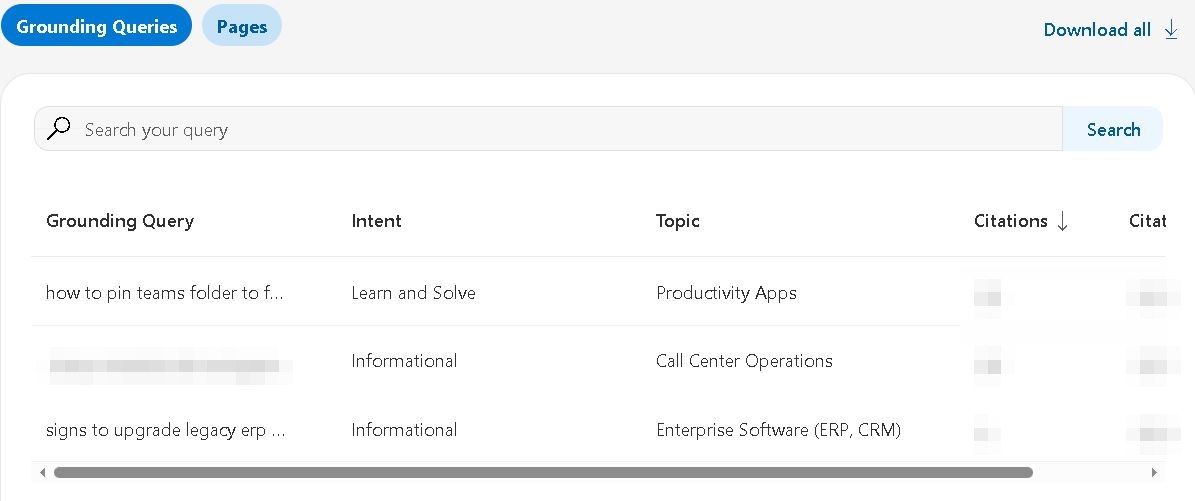
Grounding queries, with the intent and topic Bing assigns to each (one query hidden; numbers hidden).
4. Paid SEO tools: share of voice vs competitors
The main SEO platforms now sell AI visibility tracking, usually as a paid add-on or on higher plans. They run a set of prompts through AI assistants on a schedule and record who gets mentioned and cited.
- Semrush AI Visibility Toolkit: tracks prompts you choose in ChatGPT and Google AI Mode, with an AI visibility score against competitors, share of voice, sentiment and the prompts where competitors are cited and you aren’t.
- Ahrefs Brand Radar: reports mentions, citations and AI share of voice across AI Overviews, AI Mode, ChatGPT, Perplexity, Gemini and Copilot, using Ahrefs’ own large set of prompts plus custom prompts you add.
- Moz Pro AI Visibility: shows your share of mentions in ChatGPT and Gemini answers next to up to three competitors, on Moz’s mid-level plans and up.
These are the only tools that track competitors over time across several assistants. Before you buy, check two things:
- Whose questions are being tracked? A prompt set built from keyword data may not include the questions your B2B buyers ask. Add your own 10 to 15 buyer questions as custom prompts.
- What will you do with the number? Share of voice tells you whether you’re winning. It doesn’t tell you which page to fix or why a competitor is cited instead.
Coverage and pricing change often; check each vendor’s current documentation.
5. Manual checks: your own buyer questions
You can check AI visibility by hand for free. Write down 10 to 15 questions your buyers ask before they know your name, ask each one in ChatGPT, Gemini and Perplexity, and record who gets named and which sites are cited. How to check your AI visibility in 30 minutes walks through it with a tally sheet.
This is the only method that uses exactly your buyers’ questions. It breaks down at scale: answers change from one run to the next, so each question needs asking several times, and the tally adds up quickly.
6. Where our checker fits
Our free AI visibility checker does what the manual method does, for one page at a time: it asks AI assistants the questions that page should answer, several times each, records who gets cited, and compares you with the competitors named instead. It also scores the page’s readiness (the AEO score) and lists what to fix. The methodology page explains how both numbers are calculated.
It doesn’t replace GA4, Search Console or Bing; they measure what happens on your own site over time. Use the checker to find out why a page isn’t cited and what to change, then watch the free reports to see whether it worked.
Most analytics tools tell you what happened after an assistant cited your content. The checker answers an earlier question: why didn’t the assistant choose you in the first place?
A monthly routine for a B2B website
Example: an industrial packaging supplier with 12 service and product pages and one marketing manager. Once a month, about an hour:
- GA4: AI Assistant sessions, top landing pages and form submissions from them. Note any AI sources still under Referral.
- Search Console: AI impressions and the top 10 pages in the Generative AI report.
- Bing Webmaster Tools: total citations, top cited pages and new grounding queries.
- Buyer questions: ask the same 10 to 15 questions (by hand, or with a paid tool’s custom prompts) and record who’s cited.
- One line per month in a spreadsheet, so the trend is visible.
After several months, the goal isn’t a perfect number. It’s to see whether more of your buyer questions lead to citations, more citations lead to visits, and more visits lead to inquiries.
Every 6 to 8 weeks, after you’ve changed pages, re-run the checker on the pages you fixed. AI citations take that long to move, so monthly numbers will be noisy; look at the trend across two or three months. For what to change when the numbers don’t move, see how to get your website cited by ChatGPT, Gemini and Perplexity, and for what a good score looks like, what is a good AI visibility score.
Frequently asked questions
Can Google Analytics track traffic from ChatGPT?
Yes. GA4’s default AI Assistant channel includes visits from ChatGPT, Gemini, Copilot and other assistants, and ChatGPT adds utm_source=chatgpt.com to its links. Visits from AI apps without a referrer can still land in Direct, so the number is a minimum.
Does GA4 show traffic from Google AI Overviews?
No. Google counts clicks from AI Overviews and AI Mode as Organic Search, not as AI Assistant traffic. Use Search Console’s Generative AI performance report to see impressions in those features.
Does Search Console show clicks from AI Overviews?
Not separately. Clicks from AI Overviews and AI Mode are included in the normal Performance report under the Web search type, mixed with other search clicks. The Generative AI performance report shows impressions only.
Does Bing Webmaster Tools show ChatGPT citations?
Microsoft says the AI Performance report covers Copilot, AI summaries in Bing and select partner integrations. It doesn’t say ChatGPT is included, so don’t treat it as a ChatGPT measure.
What is AI search visibility?
How often AI assistants such as ChatGPT, Gemini, Perplexity, Copilot and Google’s AI Overviews name or cite your business when people ask questions in your area, usually compared with competitors. It’s a results measure, separate from search rankings and from an AEO (readiness) score.
Do I need a paid tool to track AI visibility?
Not to start. GA4, Search Console, Bing Webmaster Tools and a monthly manual check cover the basics for free. Paid tools add competitor share of voice across several assistants over time, which is useful once you’re actively working on AI visibility.
How often should I check AI visibility?
Review the free reports monthly and look at the trend over two or three months. Re-check specific pages 6 to 8 weeks after you change them; AI citations rarely move faster than that.
Why am I getting AI traffic but no leads?
Visitors from AI answers still need to land on a page that answers their next question. If they keep leaving without contacting you, review those landing pages: calls to action, pricing information, examples and proof points. Traffic alone also doesn’t show that AI assistants recommend you for the right buyer questions; check which questions you’re cited for, not just how many visits arrive.
Why don’t my numbers match between tools?
Each tool measures something different: GA4 counts visits, Search Console counts impressions in Google’s AI features, Bing counts citations in Copilot, and paid tools count mentions for their own prompt sets. They won’t add up to one number; use each for the question it answers.
The free reports tell you whether AI search is sending you visitors and which pages it uses. They don’t tell you who’s being recommended instead of you. Run our free AI visibility checker on your most important service page to see the competitors cited for its questions and what to fix, or talk to us about improving it.

Join the discussion
No comments yet.
Leave a Reply